Journal Tab
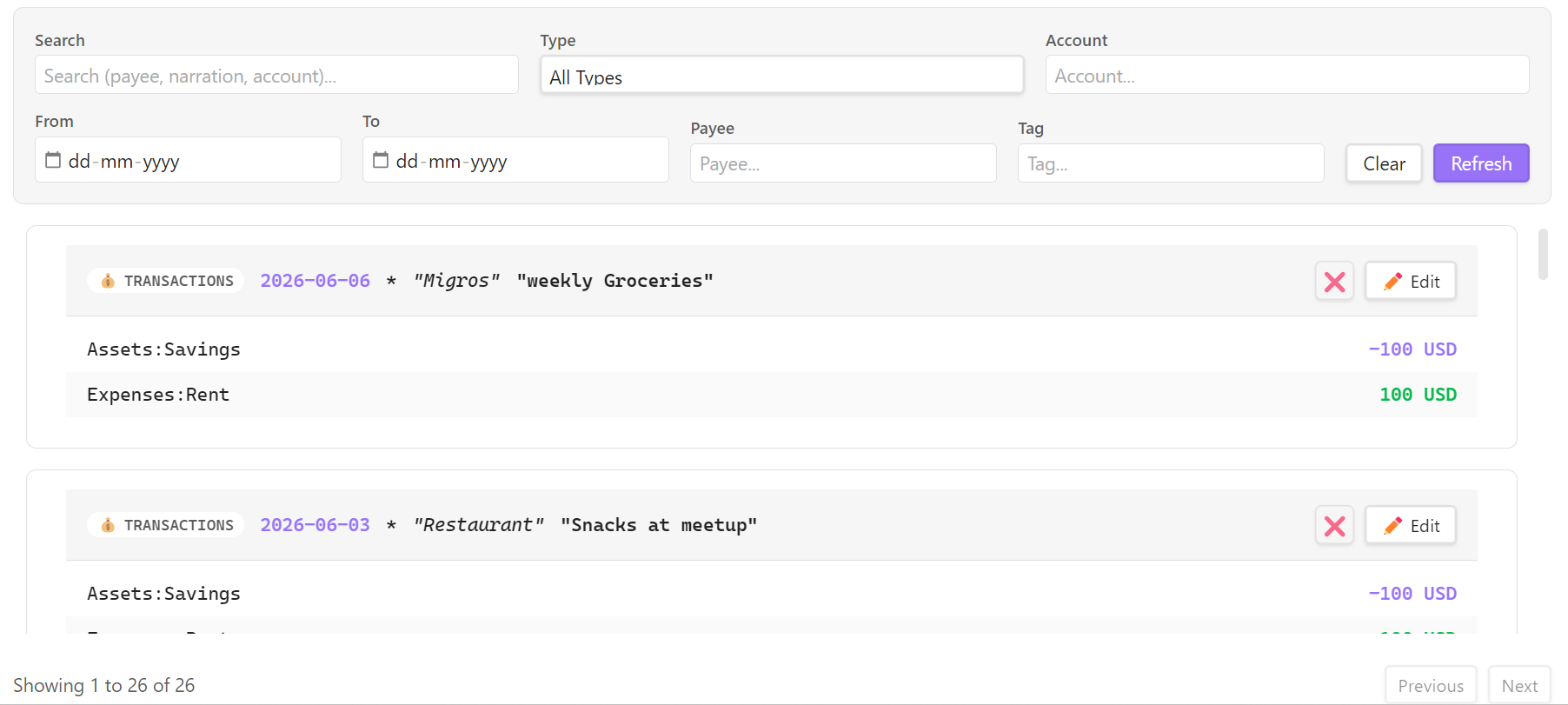
The Journal Tab provides a comprehensive chronological log of every directive inside your ledger—similar to the interface offered by Fava.
📋 Features
Complete Entry Stream
Unlike the Transactions tab which focuses solely on postings, the Journal view merges three directive types into one chronological stream:
- Transactions: Standard double-entry entries.
- Notes: Informational text notes attached to accounts.
- Balance Assertions: Reconciliations asserting account balances.
Other directive types (events, commodity declarations, documents, etc.) aren't shown in the Journal — use the Editor view or a BQL query to inspect those.
Full Management Capabilities
Action buttons are compact, icon-only layouts tailored to each directive type:
- View Details: Click any card/entry to expand it and see full metadata, tags, and file locations.
- Edit (✏️): Open the directive in the transaction modal or editor.
- Save as Snippet (📋): (Transactions only) Save the selected transaction as a template to
snippets.beancountunder a custom name for easy replication later. - Delete (❌): Safely delete directives directly from the stream (requires confirmation).
- Live Search: Instantly filters entries as you type in the search bar.
Advanced Filtering
- Date Range: Filter entries by start and end dates.
- Account Filter: Display only entries involving a specific account subtree.
- Entry Type: Dropdown to narrow the stream to one type at a time (All Types, Transactions, Notes, Balances). Other directive types always remain visible.